Diferencia entre revisiones de «Visualization of vector fields in a solid»
De MateWiki
| Línea 23: | Línea 23: | ||
Archivo:Campovector1.jpg|Mesh in a rectangular solid | Archivo:Campovector1.jpg|Mesh in a rectangular solid | ||
</gallery> | </gallery> | ||
| + | |||
| + | == To go further == | ||
| + | |||
| + | [[Mesh of a parametrized 2-D solid]] | ||
| + | |||
| + | [[Visualization of a scalar field in a solid]] | ||
| + | |||
| + | [[Dibujar un sólido 2-D]] | ||
[[Categoría:Curso ICE]] | [[Categoría:Curso ICE]] | ||
[[Categoría:Teoría de Campos]] | [[Categoría:Teoría de Campos]] | ||
[[Categoría:Articles in English]] | [[Categoría:Articles in English]] | ||
Revisión del 10:26 29 nov 2013
We show how to visualize vector fields on plane regions, representing solids, with Octave UPM. We focus on the example in Dibujar un sólido 2-D, i.e. the rectangle [math] [-1/2,1/2]\times [0,2][/math] and the vector field [math] f(x,y)=x\vec i + y \vec j[/math]. We follow the steps:
- We introduce a sampling of the two segments with a suitable step
- With meshgrid command we define two matrixes with the x and y coordinates of the mesh points
- Compute the two components of the vector field in the grid points.
- We use the quiver command to draw the field and adjust the axis. We see the picture from the top.
1 MATLAB code
x=-0.5:0.1:0.5;       % sampling of the interval [-1/2,1/2]
y=0:0.1:2;            % sampling of the interval [0,2]
[xx,yy]=meshgrid(x,y); % matrixes of x and y coordinates
figure(1)
fx=xx;                 % x-component of the vector field
fy=yy;                 % y-component of the vector field
quiver(xx,yy,fx,fy)     % Draw the vector field
axis([-2,2,-1,3])      % select region for drawing
view(2)                % See the pisture from the top
2 Example
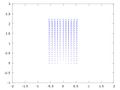
Mesh in a rectangular solid

3 To go further
Mesh of a parametrized 2-D solid

